December 8, 2025
Decorator Pattern Explained Simply
During application development, we often encounter situations where we need to add new functionalities to an existing one. However, doing so can lead to unpredictable errors. This is because when modifying the code of an old function to accommodate a new one, we need to minimize the possibility of the added functionality affecting shared variables.
In this case, you should use the Decorator design pattern to implement the modifications. Simply put, the Decorator pattern allows you to add new behavior to an object without affecting the behavior of other objects within the same class.
1. Problem
Imagine that you have a Customer with a property called Cart and behaviors like AddToCart and CheckOut. In a typical workflow, the user will add products to their Cart and then perform CheckOut. Once the CheckOut information is successful, the order details will be sent to your warehouse for shipping.
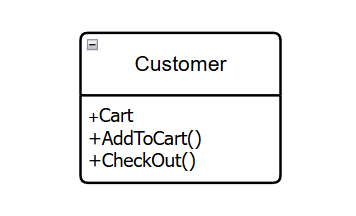
However, according to new customer demands, a faster shipping carrier is added. Now, customers can choose between the traditional shipping carrier and the faster one. At this point, you might think of modifying the CheckOut process to add a condition: if the customer selects a different shipping carrier, you will execute a different CheckOut behavior.
But if more shipping carriers are added in the future, managing the code will become increasingly difficult due to the numerous conditions and behaviors being added. Therefore, it's best if these new behaviors are added using a Decorator.
By creating a base decorator class that wraps the Customer object, we can rewrite the CheckOut behavior with the newly added processing while still preserving the original behavior of the Customer object.
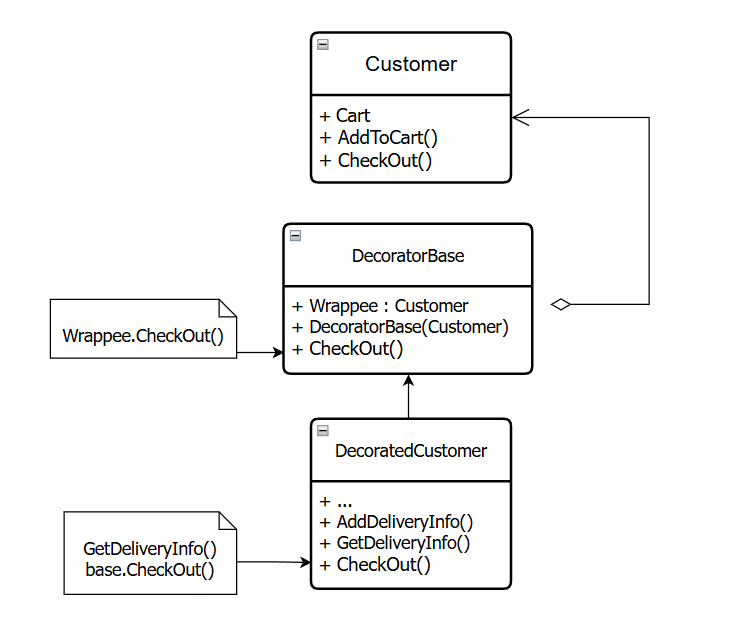
2. Usage examples (Decorator Pattern)
I will write a code snippet to illustrate how to use the decorator in the above scenario as follows:
Cart.cs
namespace Decorator
{
    public class Cart
    {
        public List Products { get; private set; } = [];

        public void AddProduct(string product)
        {
            Products.Add(product);
        }

        public string Details()
        {
            return string.Join(", ", Products);
        }
    }
}
Customer.cs
namespace Decorator
{
    public abstract class Customer
    {
        public Cart Cart { get; set; } = new();

        public virtual void AddToCart(string product)
        {
            Cart.AddProduct(product);
        }

        public abstract void CheckOut();
    }
}
DecoratorCustomer.cs
namespace Decorator
{
    public abstract class DecoratorCustomer : Customer
    {
        protected Customer? _customerComponent;

        public DecoratorCustomer(Customer customerComponent)
        {
            _customerComponent = customerComponent;
        }

        public override void CheckOut()
        {
            if (_customerComponent != null)
            {
                _customerComponent.CheckOut();
            }
        }
    }
}
DecoratedCustomer.cs
namespace Decorator
{
    public class DecoratedCustomer : DecoratorCustomer
    {
        private string _deliveryProvider { get; set; } = "Default delivery";

        public DecoratedCustomer(Customer customerComponent) : base(customerComponent)
        {
        }

        public void AddDeliveryInfo(string deliveryProvider)
        {
            _deliveryProvider = deliveryProvider;
        }

        public override void CheckOut()
        {
            Console.WriteLine("Delivery information");
            // Get delivery time based on the delivery provider
            GetDeliveryInfo();
            base.CheckOut();
        }

        private void GetDeliveryInfo()
        {
            Console.WriteLine($"Delivery provider: {_deliveryProvider}");
            if (_deliveryProvider.Contains("Express"))
                Console.WriteLine("Delivery time: 1 day");
            else
                Console.WriteLine("Delivery time: 2-3 days");
        }
    }
}
ConcreteCustomer.cs
namespace Decorator
{
    public class ConcreteCustomer : Customer
    {
        public override void CheckOut()
        {
            Console.WriteLine($"Checkout information: {Cart.Details()}");
        }
    }
}
Program.cs
using Decorator;

// Default customer checkout information
ConcreteCustomer customer = new();
customer.AddToCart("Fridge");
customer.AddToCart("Washing machine");
customer.AddToCart("Oven");
customer.AddToCart("Microwave");
customer.CheckOut();
Console.WriteLine("======#==#======");

// Decorated customer checkout information
DecoratedCustomer decoratedCustomer = new(customer);
decoratedCustomer.AddDeliveryInfo("Express delivery");
decoratedCustomer.CheckOut();
Console.WriteLine("======#==#======");
The result after executing the program is as follows:
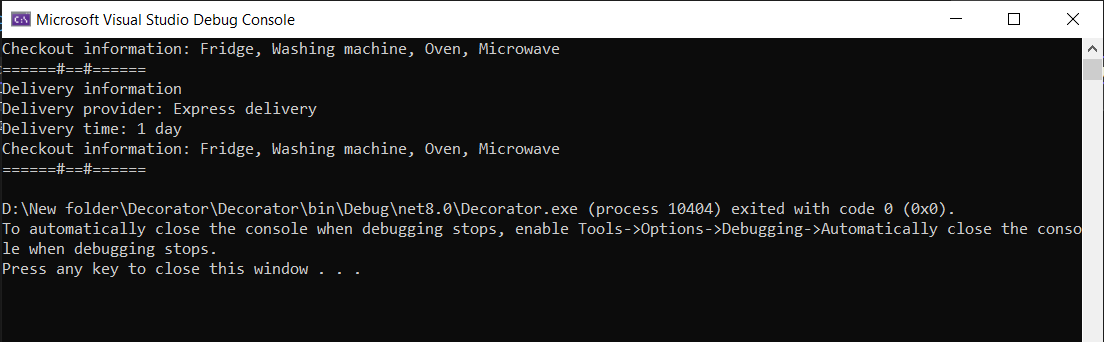
As you can see, initially the information checked out only included the Cart details. After being decorated, the checkout process can now output the shipping carrier information as well.
By implementing the above, you can customize the behaviors of an object to suit various use cases while maintaining the stability and integrity of the object. However, I also recognize that a certain level of knowledge is required to apply this architecture effectively because the overall structure can spread the functionality across multiple files, making it more challenging to read and understand. Developers need to carefully consider suitable architectures to apply to their projects to minimize potential errors.
Whether you need scalable software solutions, expert IT outsourcing, or a long-term development partner, ISB Vietnam is here to deliver. Let’s build something great together—reach out to us today. Or click here to explore more ISB Vietnam's case studies.
Reference: